

A/B Test
Split a link's clicks across up to four addresses and keep the one that does better.
An A/B Test sends part of a link's clicks to each of up to four addresses until a date you choose. Available on Business.
Open A/B Test
In the editor, pick the A/B Test card under Destination (on a saved link, click Change first). Address A is the link's destination.
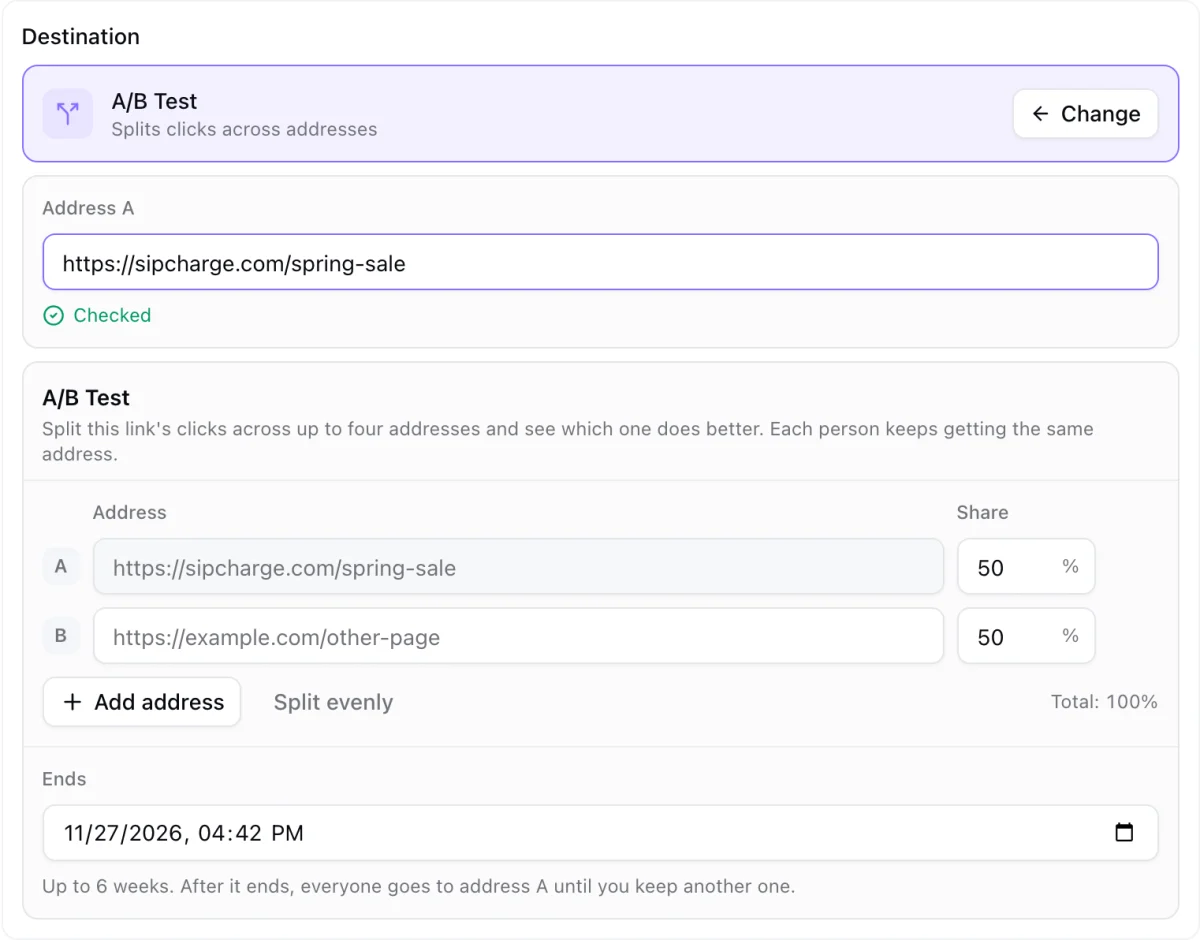
Add the addresses
Type address B, and click Add address for C and D. Give each one a Share of the clicks; the shares must add up to 100%. Split evenly does it for you.
Pick the end
Choose when the test Ends, up to 6 weeks from now.
Start and save
Click Start test, then save the link.
How people are split
Each person keeps getting the same address for the whole test, so someone who clicks twice sees the same page twice. The split follows the shares over many clicks; with only a few clicks it can be uneven.
Reading the results
Open A/B Test again to see the clicks each address has received. Analytics, KuikLinks shows the same under Top destinations, where each row says which address it is.
Ending a test
- Keep this one next to an address makes it the link's destination and ends the test. Save the link to apply it.
- When the end date passes, everyone goes to address A until you keep another one.
- The x on the A/B Test pill removes the test and keeps address A.
A link uses Smart Rules or an A/B Test, not both. Every address is checked like the destination, when you save and every day after.