

Smart rules, Geolocation and geofencing
One printed code, many destinations. Route a scan by time, date, day, country, language, operating system, distance from a place or how often the code has been scanned.
Smart Rules is a destination type. Instead of one link, the code carries a list of rules that are checked top to bottom on every scan; the first rule whose conditions match decides where the visitor lands, and a fallback URL catches everything else. The printed code never changes while you edit the rules.
Smart Rules are included from the PRO plan. You can choose the card and build your rules on any plan; saving the KuikCode is the step that asks for PRO. Choose Get PRO there and your work is kept in this browser, so after checkout the editor opens just as you left it. Discard Smart Rules removes them instead, so you can choose another destination.
On a plan without Smart Rules, the editor starts with two examples, iPhone and iPad (Example) and Android (Example), each sending one kind of phone to its app store. Give one a link and it becomes your rule, without the label; the bin removes the ones you don't need.
Set it up
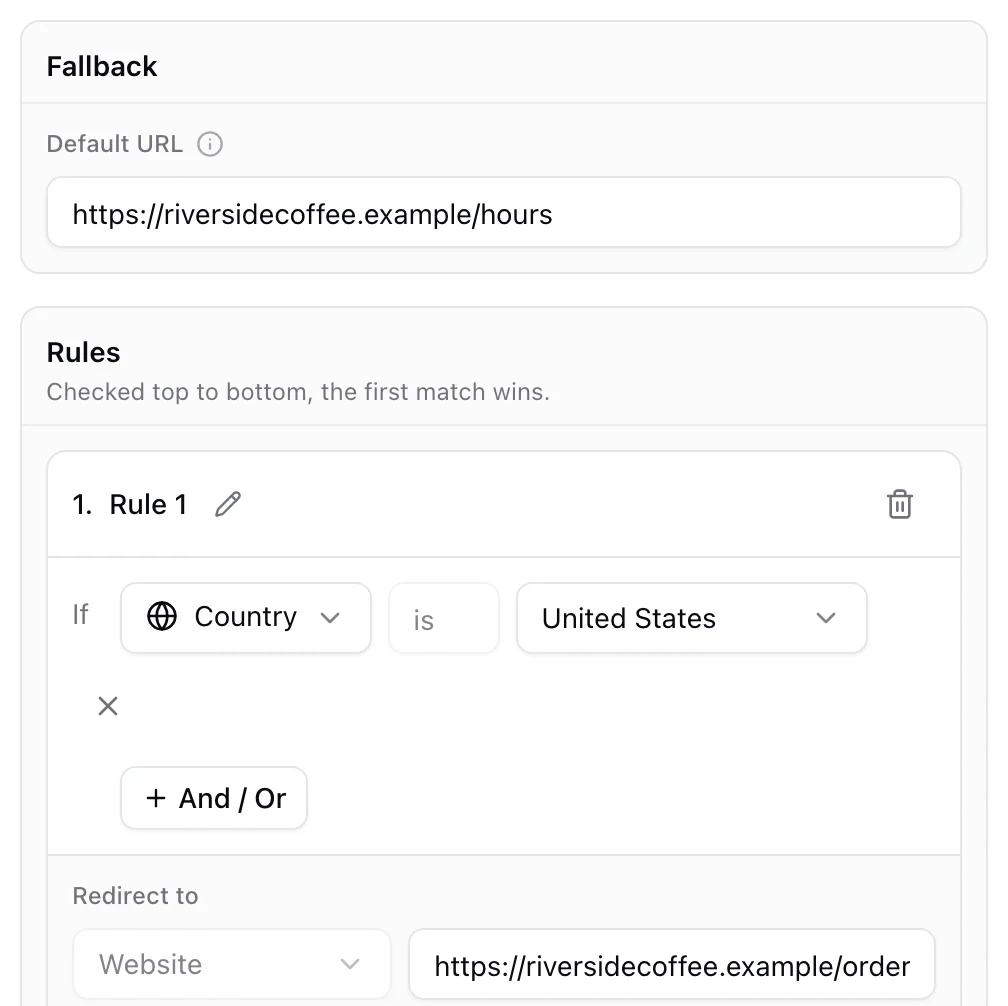
- In the KuikCode editor, choose Smart Rules as the destination.
- Fill in Fallback, Default URL. Visitors are sent here when no rule matches. A code cannot be saved without it.
- Click Add new rule. Give it a name (the pencil icon), add one or more conditions, and set Redirect to to the URL for that audience.
- Repeat for every audience. Drag order matters: the first matching rule wins. The bin on a rule removes it at once, with Undo in the message that appears.
Conditions
| Condition | Operators | Values |
|---|---|---|
| Time | before, after, between | A time of day, in the scanner's own time zone |
| Date | before, after, on | A calendar date |
| Day | is | Any set of weekdays |
| Country | is | One country |
| Device language | is | The language the phone is set to |
| Device OS | is | iOS, Android, Windows, macOS, Linux, Other |
| Location | is | A point on the map plus a range in metres |
| Total user scans | greater than, less than, equal to | How many times this code has been scanned so far |
| Unique user scans | greater than, less than, equal to | How many different devices have scanned it |
Conditions inside a rule are chained with And / Or, read left to right in the order you add them. A and B or C therefore means (A and B) or C.
Local time, not server time
Time, date and day conditions use the time zone of the place the scan happens, so "after 17:00" means the scanner's evening wherever they are.
How a scan is resolved
The scan handler receives the country, region, coordinates and time zone of the connection, the phone's language from the browser's language header, and the operating system from the user agent. Location conditions measure the straight-line distance from those coordinates to your point; if the network gives no coordinates, the condition is false. Scan counters count the scans recorded before the current one, so "Total user scans less than 100" matches exactly the first 100 scans. Scans that arrive in the same instant can see the same count, so a busy moment can let one or two extra through.
Rules whose URL is empty are skipped. Whatever decided the scan is stored with it: analytics show the rule name next to the destination that was served, and fallback when nothing matched.
Examples
- Opening hours: rule "Open" with
Time between 09:00 and 18:00andDay is Mon to Satpointing at the ordering page; fallback pointing at the opening hours page. - App download: rule "iPhone" with
Device OS is iOSpointing at the App Store, rule "Android" pointing at Google Play, fallback to the website. - Launch day: rule "Before launch" with
Date before 2026-10-01pointing at the teaser, fallback to the product page. - Local page: rule "Our town" with
Location isyour address within 5,000 m pointing at the local offers, fallback to the store finder. - First 500: rule "Early birds" with
Total user scans less than 500pointing at the promotion, fallback to the regular offer.
Geolocation
Geolocation is the simpler sibling, for when the only question is where the scanner is. It is its own destination card with two parts:
- Default URL: where everyone lands unless a rule matches.
- Region rules: each rule names a Country, optionally a State for the United States, and the URL for visitors from there. Add one per market.
Use it for one code on packaging sold in several countries, each opening the right language or the right store. When the routing needs anything beyond country and state, switch the card to Smart Rules, which includes the same country condition.
Geolocation is included with Smart Rules from the PRO plan, and works the same way: set it up on any plan, and saving asks for PRO.
Geofencing
Geofencing confines a code to a place. In Smart Rules, add a Location condition: Add location opens a map, search an address or type coordinates, and set the Range (in meters) around the pin. Scans inside the circle match the rule; scans outside fall through to the next rule or to the fallback.
- City offer: rule "In town" with
Location isyour address within 5,000 m pointing at the coupon; fallback pointing at a page that says the offer is for local customers. - Event city:
Location isthe venue within 10,000 m opens the live schedule; outside it, the ticket page. - Many locations: one rule per site, each with its own URL, ordered by priority.
The position comes from the network connection, not GPS: reliable for the country, usually right for the city, and it can be a few kilometers off on mobile data. Keep the radius generous, a few kilometers, and expect misses near the edge. To limit an offer to one shop, print the code only there or protect it with an access code instead. If the network gives no coordinates the condition is false. Analytics record which rule decided each scan, so you can see how many landed inside.
Related destination types
- Geolocation, above, for country and state only.
- A plain Website destination is all you need when everyone should land in the same place.