

Create many codes from a CSV
One spreadsheet row per code, one design for the whole batch, all filed in one folder.
Switch the toggle above the destination cards in Step 1 to Many from a CSV (One KuikCode returns). The panel walks through three steps: download the template, fill one row per code, drop the file. Design the batch in Step 2 as you would a single code; every row gets that design. In Step 3, Folder name names the folder the batch lands in.
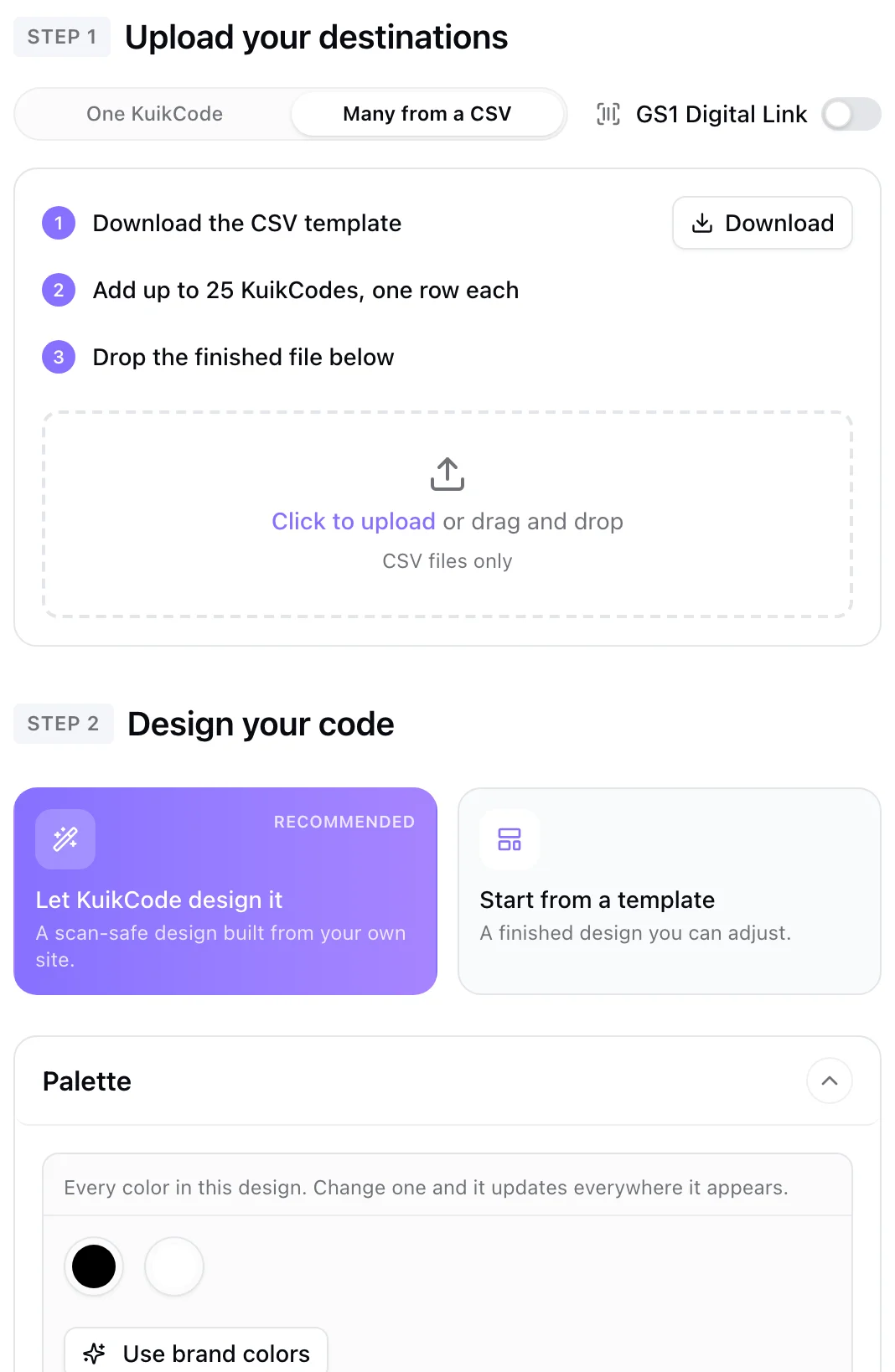
The three steps in bulk mode
- Upload your destinations. Step 1 swaps the destination cards for the CSV panel. Download the template, fill it, drop the file. The panel reads it in the browser and reports what it found: the number of rows, and any row that has a problem, with its line number.
- Design your code. Step 2 is unchanged. Everything you set here, colors, logo, frame, stickers, applies to every code in the batch. Templates and Auto Design work as usual.
- Batch. Step 3 asks for a Folder name: the batch is created inside a new folder of that name, and each code keeps the name from its row. Tags and tracking settings can be given per row in the file.
The button reads Create KuikCodes until a file is in, then Create N KuikCodes, and creates the folder and every code in one go. Until then the hint under it points to what is missing, the file in Step 1 first.
The template
KuikCode Name,Destination URL,Tags,UTM parameters,GPS (yes/blank)| Column | Required | Notes |
|---|---|---|
| KuikCode Name | Yes | Up to 120 characters, shown in your library |
| Destination URL | Yes | Any http or https link; bare domains become https |
| Tags | No | Separated by commas or semicolons, lowercased and de-duplicated, up to 20 |
| UTM parameters | No | source=qr&medium=print&campaign=spring style pairs, added on every scan |
| GPS (yes/blank) | No | yes turns on precise scan locations for that code |
Column headers are matched loosely (URL, Link, Labels all work) and extra columns are ignored. A row with an invalid URL, an empty name or a value that is too long stops the batch with its line number; fix the file and drop it again. The panel also warns if you drop the GS1 template into a plain batch, or the other way round.
Limits
A batch holds up to the plan's bulk rows ceiling: 100 on PRO, 500 on Business, and has to fit under the workspace's active-code ceiling. Batches are all or nothing: nothing is created until every row passes. A workspace can start ten batches every ten minutes.
After the upload
The success dialog offers a ZIP with every code's artwork, one file per row, named after the rows, in the format chosen next to the button. The folder appears under Assets, Folders with the batch inside. Each code is a normal KuikCode afterwards: open it to change its destination, move it, archive it, or select many in the library to retag or move them together. Analytics can be filtered to the folder, so the batch reads as one campaign.
When to use it
- Table numbers, room numbers, seat or locker labels: one row per place, the URL carrying the number.
- A print run where every piece needs its own tracking: the same destination on every row with a different UTM campaign or tag.
- Product lines: one code per SKU, see the GS1 variant below.
GS1 batches
Switch on GS1 Digital Link and pick Many from a CSV, both above the destination cards, to create one GS1 code per product. The template gains GTIN and product columns; see GS1 batches.
From the API
POST /codes/bulk takes the same rows as JSON, see the reference.