

Guest uploads
Let visitors add their own photos and videos to a KuikPage, review them, and show the approved ones in a gallery on the page.
Add a Guest uploads block (PRO and up). A wedding, a school event, a conference or a shop opening gets one code on the invitation or the table cards; guests scan it, tap Add your photos, pick from their camera roll or shoot on the spot, and the pictures land in your workspace. You decide what shows.
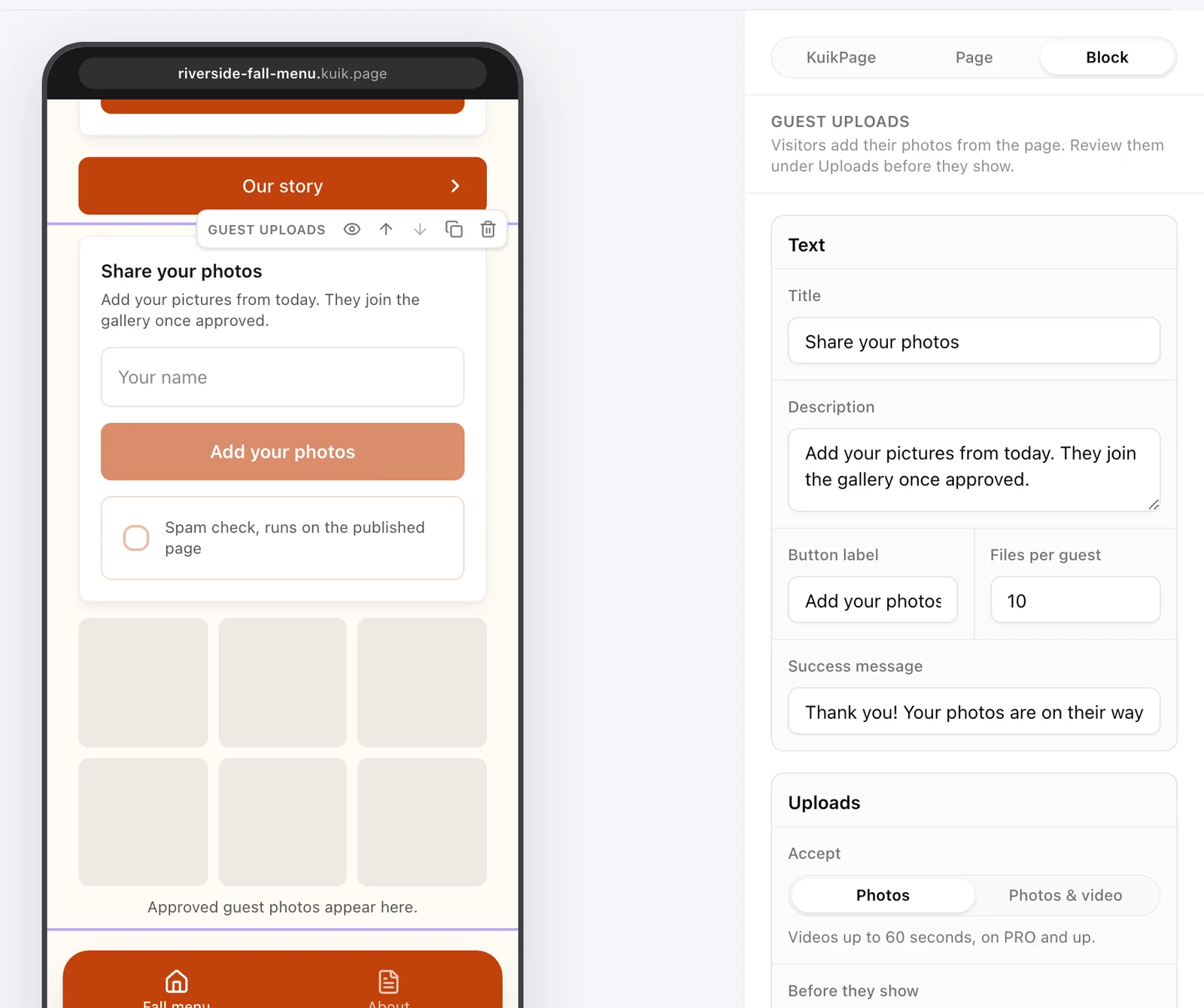
What guests see
A card with your Title and Description, an optional Your name field and a short message field, and the Add your photos button. Photos are shrunk on the phone before they leave it, so a large camera shot uploads in seconds even on venue wifi. When the upload finishes the card shows your Success message.
Once anything is approved, a See the photos link under the button opens the full-screen viewer, and the gallery under the card shows the approved uploads as a grid of two or three columns, newest first, loading more as the visitor scrolls. Tapping a photo opens it full screen with Share and Download underneath, so a guest can keep or pass on a single photo; videos play in place. Share hands the file to the phone's share sheet where the browser allows it, otherwise it shares the link. New approvals appear within about half a minute for everyone on the page.
Settings
- Text: Title, Description, Button label, Success message, and Files per guest (1 to 20 per visit).
- Accept: Photos, or Photos & video. Videos run up to 60 seconds and need PRO or above; on other plans the option stays visible but the page refuses videos.
- Before they show: Review first holds every upload privately until you approve it. Show right away puts it in the gallery the moment it lands. Review is the default.
- Ask for a name and Allow a message add the two fields above the button. The name shows under the photo in your review list, never on the page.
- Open from and Close on set a window. Outside it the button is replaced by "Uploads are closed" and the page refuses files, so a printed code stops collecting after the event.
- Style: show or hide the gallery, and pick two or three columns.
Reviewing uploads
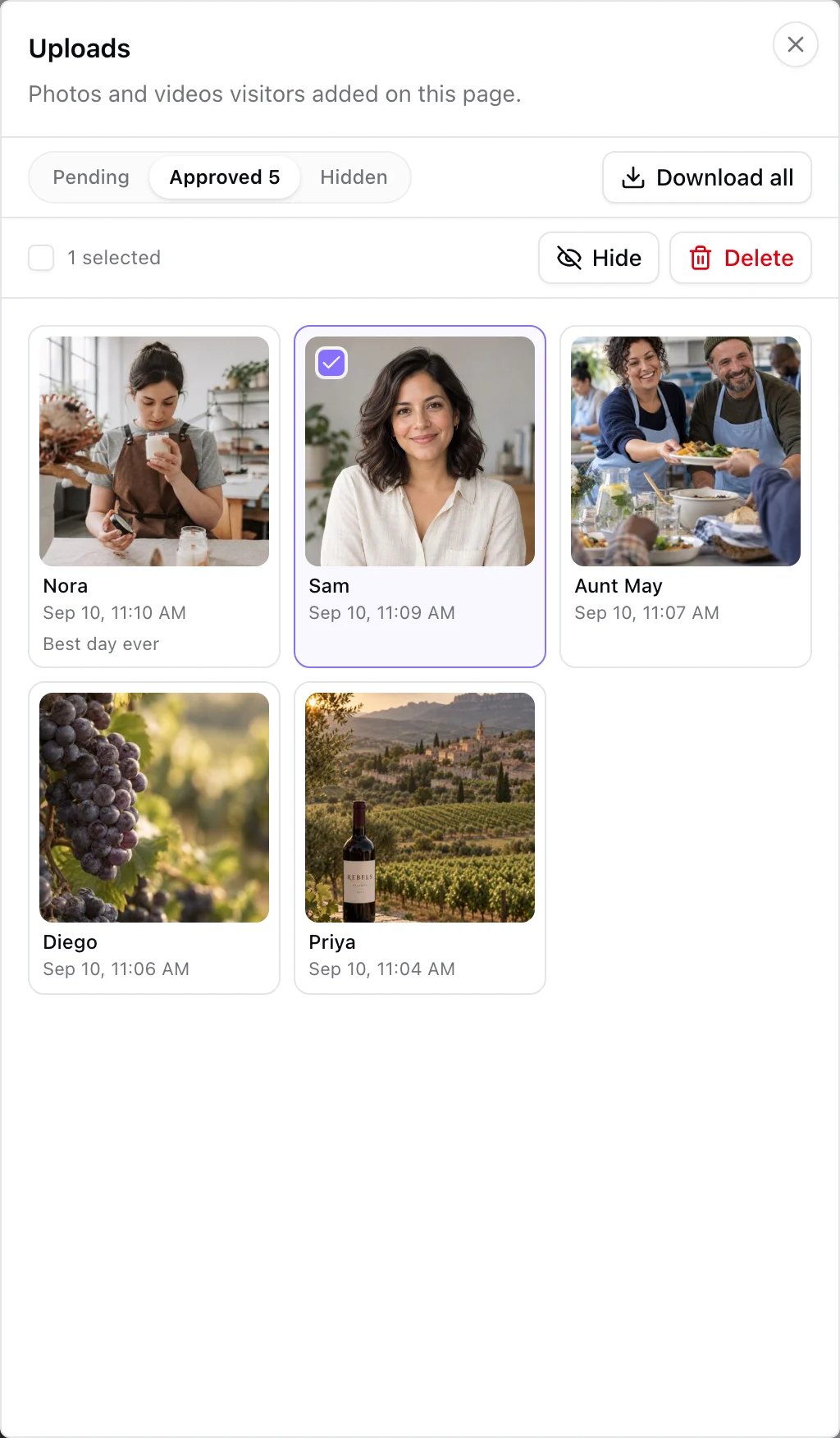
Select the block and click Review uploads at the top of its settings; the button shows how many are pending. The same sheet opens from the page menu (the three dots beside Publish, where Leads lives too). It has three tabs, Pending, Approved and Hidden. Each upload shows its thumbnail, the guest's name and message, and when it arrived; Open on a tile shows the full file. Select one or many and Approve, Hide or Delete. Deleting asks first: the files are removed for good and their storage is freed, while hidden uploads stay in your storage and never show. Download all packs the approved photos and videos into a zip and emails you a link when it is ready; the link works for seven days.
Google Drive sync
On PRO and up, the block's Google Drive section has Connect Google Drive. Google asks you to allow KuikCode to manage only the files it creates, and a folder named after the page appears in your Drive. From then on every approved upload is copied there within 15 minutes, and the Uploads sheet marks copied files with "In Drive". Files you hide or never approve are not copied. Disconnect stops the copies and revokes KuikCode's access; what is already in the folder stays yours.
Review reminders and retention
- Reminders. When the block reviews before showing, workspace owners get one email an hour at most per page while uploads are waiting, with a link straight to the Uploads sheet. Switch the block to Show right away to skip both the review and the reminders.
- Retention. A block with a Close on date keeps its files for ninety days after that date. A week before they are removed, owners get one warning email. On the day, files that were never copied to Google Drive are removed and their storage is freed; copied files stay in your Drive. Blocks without a close date keep everything until you delete it.
Storage and plans
Guest uploads count against a separate storage allowance per workspace, shown on the Plan & Billing card: 10 GB on PRO, 50 GB on Business. When it is full the page tells guests the host has run out of space, and nothing is lost. Photos are stored at up to 1600 px on the long edge as JPEG.
The full comparison sits on the Plans page.
Privacy
Files are stored on KuikCode's storage and served from your page's address only. Nothing is public until you approve it, and a guest's name and message are visible to you alone. Uploads follow the page: deleting the page deletes them.