

Naming, filing and downloading
A new code names itself after its destination. Step 3 files it and sets the scan link it will be printed with, then you save or download the artwork.
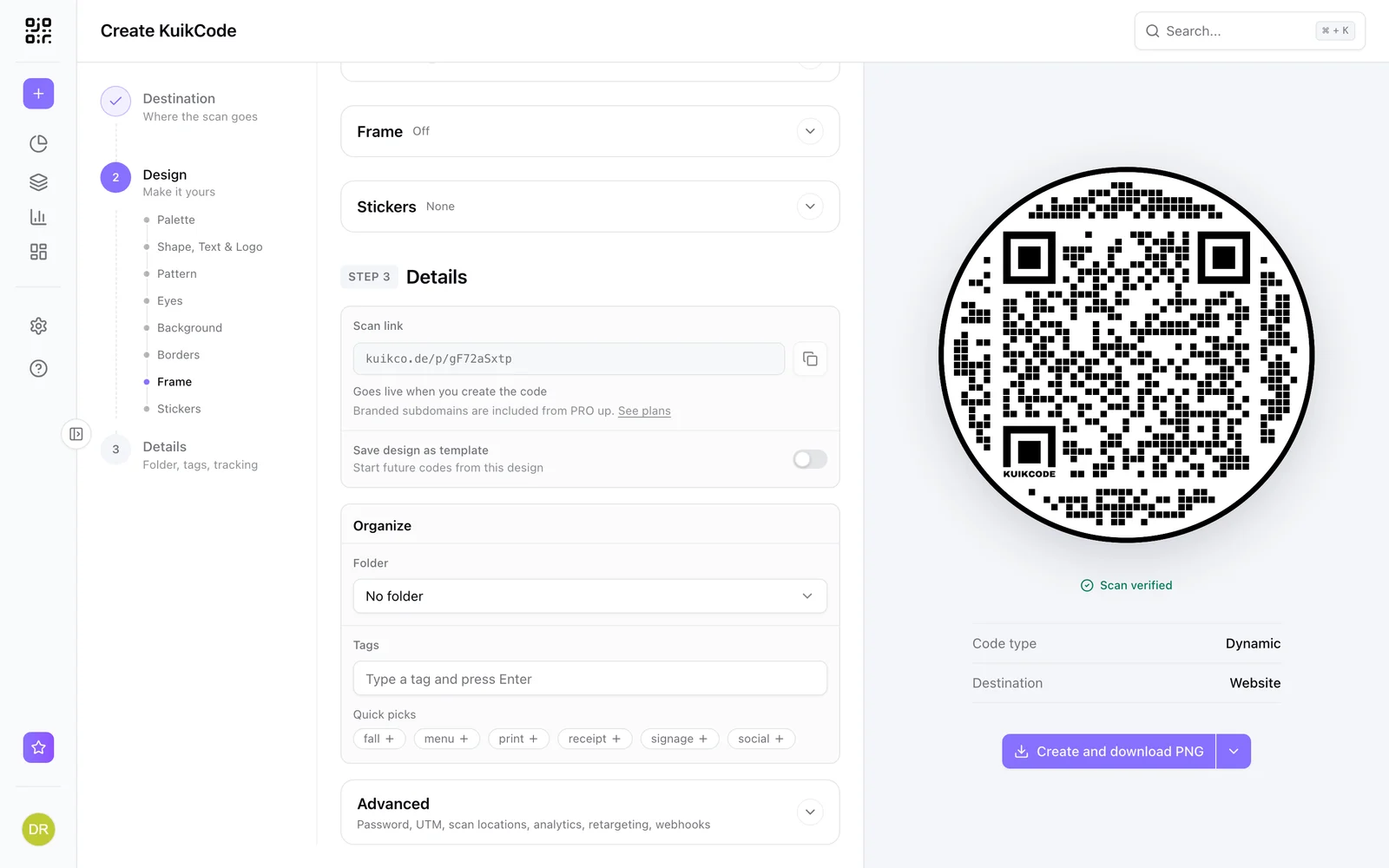
Name
A new code is named after its destination as soon as Step 1 has one: a website's address (riversidecoffee.com/menu), a file's name or the landing page title you wrote for it, a KuikPage's or hosted site's name, a contact's or an event's name, a WiFi network, a phone number. The name is the title at the top of the editor, so Create and download never waits for one. Click it to change it: a name you type stays put when the destination changes, and clearing it goes back to the automatic one. Up to 120 characters. It's how the code appears in your library, in analytics and in reports, and it names the downloaded file. Pick something a colleague would recognise in a list: "Front window", "Table 4", "Fall flyer, back".
On a saved code, a new name is saved as soon as you confirm it, and so is Move to folder: neither waits for Save.
Scan link and template
The Scan link opens Step 3: it is the address printed into the artwork; see Scan link below. The switch after it, Save design as template, keeps this design for future codes. Give the template its own name.
Organize
- Folder files the code. Pick New folder at the bottom of the list to create one inline. Folders nest.
- Tags label the code for filtering in the library and analytics. Type and press Enter, or click a Quick pick, which lists the tags already used in the workspace. Up to 20 tags per code.
Scan link
The Scan link is the address encoded into the artwork. By default it is the shared kuikco.de/p/... link; PRO and Business workspaces can pick their branded subdomain or a custom domain. With more than one option, a dropdown groups them as Included, Your subdomain and Your domains; with only one, the link is shown as is. The copy button copies the full link once the code exists: on a new code it stays disabled with Goes live when you create the code, and the confirmation after Create and download offers the copy instead. It is chosen once, at save, because it gets printed. Changing it on an existing code asks for confirmation: codes you already printed keep working, and only artwork you download from then on uses the new link. See Branded scan links.
Advanced
Advanced closes the step, collapsed: password protection and the tracking options.
Download
For a new code the main button reads Create and download PNG: it creates the code and downloads the artwork in one step, and the arrow on its right changes the format. It stays disabled until Step 1 has a destination; until then Step 1 shows Required and a Go to Destination link sits under the button. A website link that isn't a web address yet says Check the link in Destination instead.
For an existing code, Save stores your changes without downloading anything, since most edits (a new destination, a rule, a tag) need no new artwork. It turns on once something has changed: Unsaved changes under the buttons says there is something to save, and Saved that it went through. Below that, a reminder: design changes apply to new downloads, and printed codes keep working. Download PNG next to it saves your changes, if there are any, and downloads the current design; its label follows the chosen format, and the arrow on its right changes the format. The formats:
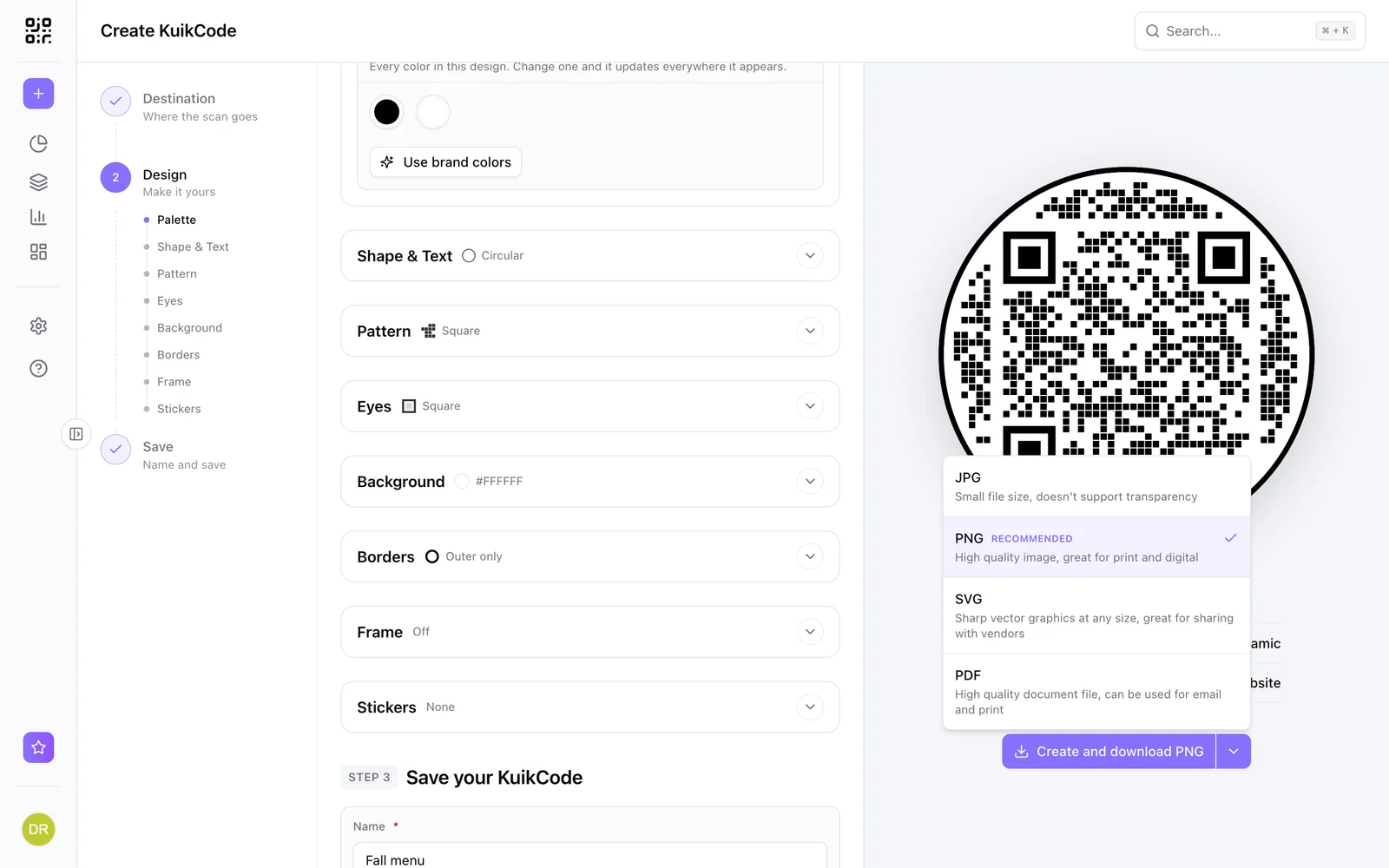
| Format | Best for |
|---|---|
| PNG | Print and digital, recommended |
| JPG | Small files, no transparency |
| SVG | Vector at any size, for designers and printers |
| Documents and email |
Artwork renders at 2000 pixels. For a transparent background choose Transparent in the Background section. The same artwork is available programmatically through the API's image endpoint, and every card in the library has a download icon for a quick PNG.
After saving
The success dialog confirms the code is live and hands you its scan link. The page also becomes the code's own edit page, so a refresh or a bookmark brings you back to it; Keep editing this code shows it with its header (name, scans, folder). From here the code shows up in Assets, KuikCodes and in its folder; see The library for what you can do with it there.
If a save or a download fails, a short message under the button says what went wrong and what to try. When the file couldn't be created but the code was saved, the code is live and Download tries the file again. Hitting a plan limit opens the plan comparison instead, naming the limit you reached.
Leaving with unsaved changes
While the editor holds changes you haven't saved, every way out asks first: a link in the sidebar, a search result, the account menu, signing out, or your browser's Back button. Keep editing returns you to your work; Leave discards it. On a saved code only your new changes are lost, the code stays as it was.