

KuikLinks
Short links that live in the same workspace as your KuikCodes, with their own analytics.
A KuikLink is a short link, such as kuik.sh/spring-sale, that forwards people to a web address you choose. You can change where it goes at any time, and every click is counted. KuikLinks share your folders, tags, Smart Rules and UTM with KuikCodes, and have their own page under Analytics.
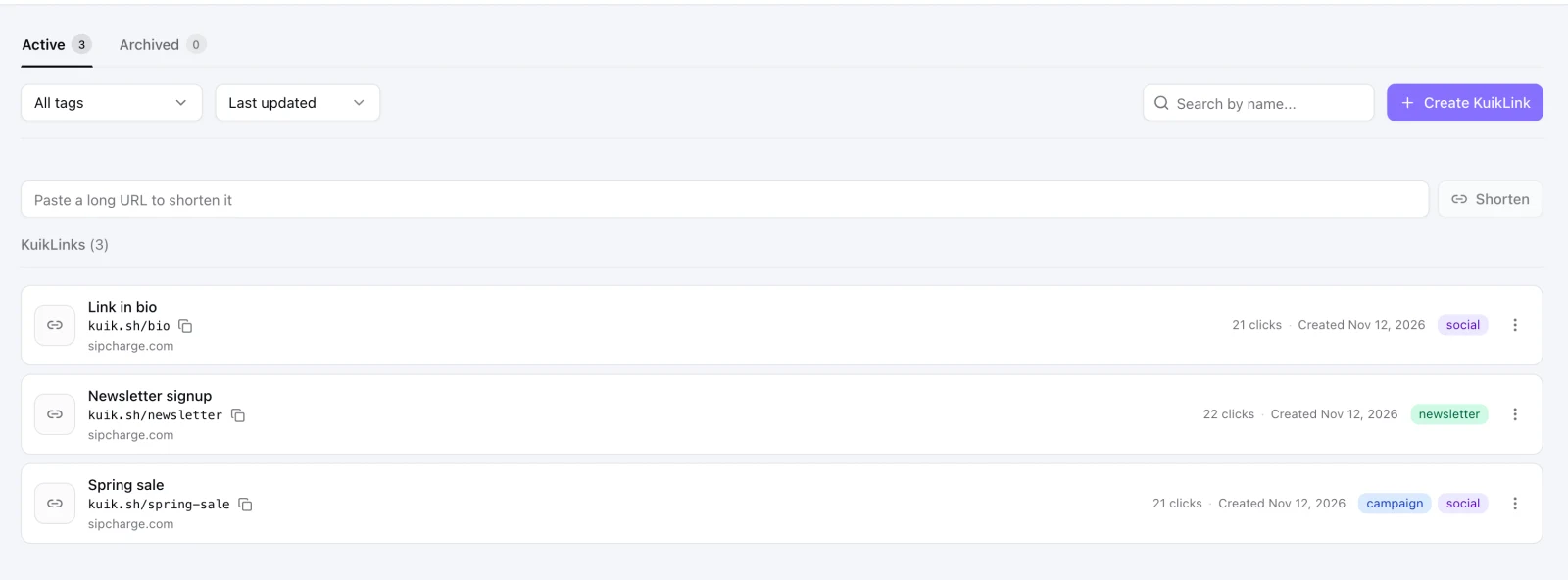
What a KuikLink can do
- Forward to any web address, and be repointed later without changing the link.
- Read well: a random nine-character id by default, or an ending you choose. See Readable links and domains.
- Look right when shared: its own image, title and description. See Link preview.
- Tag campaigns: UTM values, saved as templates. See UTM and templates.
- Decide where each person goes by country, device or time. See Smart Rules.
- Compare addresses: an A/B Test across up to four. See A/B Test.
- Stay private or temporary: a password or an end date. See Password and expiration.
- Be measured: clicks, people, sources and places. See Analytics.
A link and a QR code together
A KuikLink has no QR code of its own. A QR code for a link is a KuikCode made for it, which you design like any other and which opens the same destination. It uses one of your plan's KuikCodes. Scans of that code are counted apart from clicks on the link, so you can tell which one people used.
How many you can create
A plan includes a number of new KuikLinks per month: 10 on Basic, 100 on Core, 1,000 on PRO and 10,000 on Business. The 14-day trial includes 25. Clicks are unlimited. Archiving or deleting a link does not give the month's unit back. Usage at the bottom of the sidebar shows how many you made this month and the day the count resets; Settings, Plan & Billing shows it too.
Safe by default
Every destination is checked when a link is saved and again every day. See Safety and reporting.